Pixel Watch 5 Keeps the Two-Screw Design and 9/10 Repairability Score
iFixit gave Pixel Watch 5 a provisional 9/10, matching Watch 4. Colour-coded screws refine the familiar design, while screen replacement still takes more work.
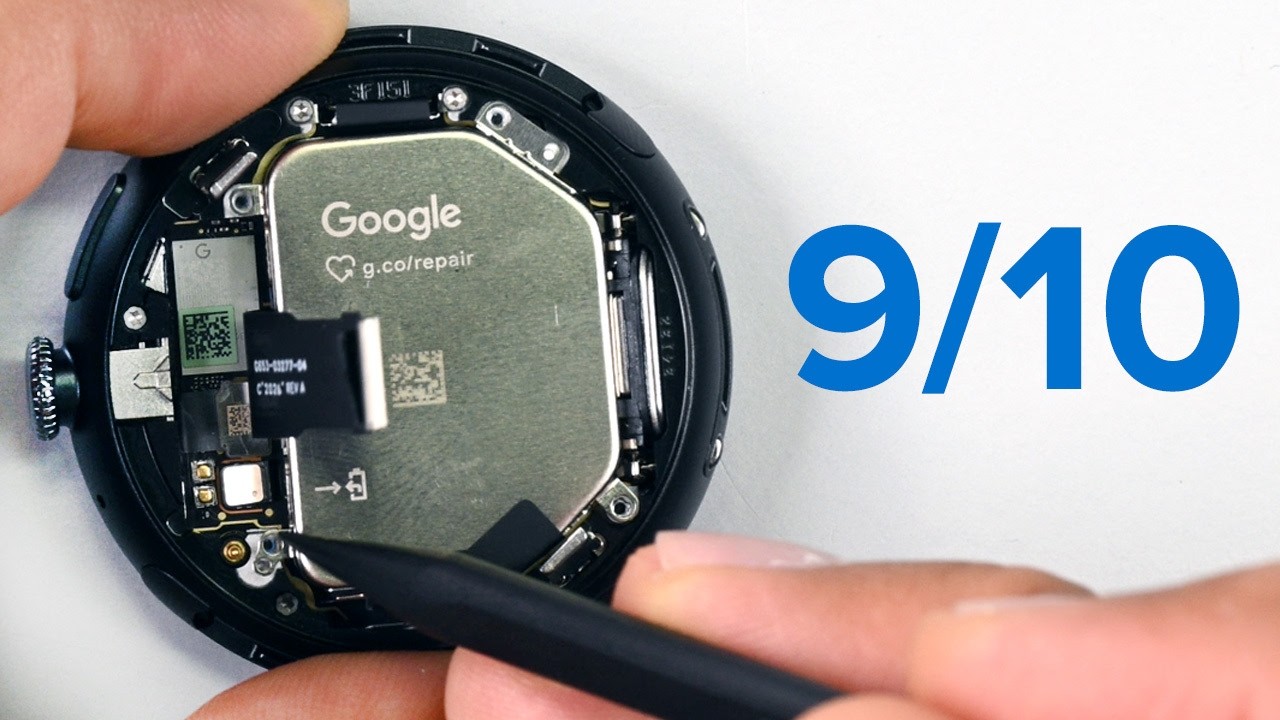
Open a glue-sealed smartwatch and a battery job can begin with heat and careful work around the glass. Google's Pixel Watch 5 starts with a screwdriver instead. The distinction is useful, but it is not new this year: the Pixel Watch 4 already used the same basic approach.
iFixit tore down the 45mm model and handed it a provisional 9 out of 10 on its smartwatch repairability scale, matching the Pixel Watch 4. Notebookcheck and TechEBlog's accounts agree on the practical result: the rear cover gives relatively direct access to the parts most likely to need attention.
Built like a dive watch, not a tiny phone
The design point is that Google stopped treating a watch as a shrunken smartphone. Two Torx Plus screws release the interior latches, the rear sensor glass lifts away, and the battery, vibration motor and mainboard are accessible. iFixit's screen-replacement guide specifies a 2IP driver and warns that the back glass remains attached by a cable. Easy access still calls for careful handling.
The seals do the sealing. The watch is rated IP68 and 5 ATM, with O-rings and gaskets around the openings. That is not a guarantee that a repaired watch retains its original water resistance: iFixit warns that the tiny screw O-rings must be present and undamaged, and that the back glass needs to seat properly during reassembly.
Green screws mark the route to the battery
Hardware-wise, there is not much separating this from last year's model. The 45mm battery grows to 465 mAh, a 2.2% bump over the Pixel Watch 4's 455 mAh cell. The chip moves to Qualcomm's Snapdragon W5 Gen 2 Accelerated platform, memory rises to 3GB of LPDDR4, and eMMC storage doubles to 64GB. Google quotes up to a 20% performance gain.
The repair refinements are smaller than any of that. The battery itself is printed with a pointer to Google's repair hub, for anyone who got inside without a plan. Green screws mark the path to the vibration motor and the cell beneath it, so the disassembly order is colour-coded rather than memorised. TechEBlog reports that a dedicated battery guide is already available.
Screen replacement is where the design still asks something of you. Several screws of varying lengths, a bracket and a press connector stand between you and the panel, and Notebookcheck reports that iFixit would like this step simplified. Notebookcheck flagged the same step as the one weak link in an otherwise clean teardown. Owners of the LTE variant get one extra hazard, a loose antenna pogo pin on the side of the chassis that TechEBlog flags as easy to lose if dropped.
A score is only worth the parts behind it
Teardown scores get overrated. A device can be trivial to open and still be unfixable if nobody sells you a screen. Gagadget makes that point in its write-up: what separates the Pixel Watch 5 from rivals that disassemble neatly is that repair documentation and access to spare components matter alongside the design, so the accessible design connects to an actual supply of parts. TechEBlog reports guides for the battery, screen, sensor glass and vibration motor. Buyers should check availability and cost for the exact replacement component before starting a repair.
Notebookcheck also notes iFixit's disclosed business relationship with Google. That belongs alongside the score: readers can distinguish the commercial relationship from the physical design shown in the teardown and documented in the repair guide.
Watch 4 owners already have the basic design
The comparison with Watch 4 is the useful restraint on the enthusiasm. The predecessor earned the same score, and iFixit says its screen guide uses photographs from a 41mm LTE Watch 4 because the procedures are functionally the same across the listed Watch 4 and Watch 5 sizes. This is continuity in a repairable design, not a reason to replace a working older watch.
That reframes the teardown. A slightly larger battery and faster chip are separate benefits from being able to replace a worn cell. The repair score describes access and serviceability; it does not promise a particular number of extra years, a cheap repair bill or a longer software-support window.
For an owner facing a battery or screen failure, the practical next step is the relevant guide and a check that the part is available. Two screws make the opening less daunting. The remaining work, particularly around the display and seals, still deserves attention.
Sources: youtube.com · notebookcheck.net · gagadget.com · techeblog.com · ifixit.com